Wednesday, 13 July 2011

AMD A75 Microsite details GIGABYTE A series motherboards

A75_ad

The more sharp-eyed among you may have noticed our official AMD A75 microsite that we recently added to the GIGABYTE site. This microsite highlights the latest AMD A75 GIGABYTE motherboard series, details specific motherboard SKUs along side detailed specifications and also features information about the excellent onboard DX11 graphics and Dual Graphics capabilities of the all new AMD Llano APUs.

You can also learn about GIGABYTE specific advanced features, including On/Off Charge, port-by-port USB overload protection, DualBIOS 3TB + And don’t forget of course that you can use GIGABYTE’s acclaimed EasyTune 6 technology to tweak your AMD APU, memory and GPU to squeeze every once of performance from these Llano processors. Our resident overclocker managed a remarkable 6000 points in 3DMark Vantage Performance on air using high performance memory DIMMs!

 002

And don’t forget that in 2011, we talking about our GIGABYTE Super4 concept. Super 4 basically means that no matter which A75 motherboard model you select, you’ll still be able to enjoy the best quality features that will ensure you’re guaranteed a solid and stable PC build. GIGABYTE Ultra Durable 3 technology, plus 3X USB power, On / Off Charging, Low RDS (on) MOSFETs and advanced Blu-ray optimized 108dB audio quality are just some of the features that we’ve tied together ensuring Super Safe, Super Speed, Super Savings and Super Sound features are built into all models, including the most affordable ones.

GIGABYTE A series microsite,

This blog can be read in Chinese (中文版) here.

Tuesday, 12 July 2011

Coolaler.com Forums: Llano graphics out-paces AMD 6 series VGA card

Well-known Taiwanese reviewers at XtremeSystems have tested our Gigabyte A75M-UD2H motherboard and the AMD Llano A8-3800 APU. As well as looking at the A75M-UD2H board itself and its packaging, they also looked at how the A8-3800 APU and the A75M-UD2H teamed up in terms of basic performance and overclocking tests.

01

02

Interestingly, they also took the time to compare the new Llano A8-3850 APU with previous generation AMD architectures. They took AMD Athlon II X4 645 and Phenom II X4 970BE CPUs (both clocked at the same 2.9GHz), pairing them both with an AMD 6450 HD discrete card.

 2900

In terms of the actual CPU performance parts, the Llano APU just about wins in all the test against the Athlon II, but the gap is not too much, winning by a maximum 20% in CPUmark99. The Phenom II fairs marginally better, beating the Llano in some CPU tests. In terms of display performance however, the integrated Lynx GPU wipes the floor with the HD6450 discrete card on all benchmarks.

This is a really great demonstration of how AMD’s new Llano platform is offering a really compelling upgrade option for AMD users and DIY builders looking for a solid graphics and processing performance.

You can read the full review here (Google translation).

Chinese version here.

PCTuning use GIGABYTE boards for early Bulldozer and Gulftown head to head

sli_2

It would appear that Czech hardware site PCtuning have apparently been lucky enough to get their hands an early AMD FX CPU sample, giving us a glimpse of the performance we can expect from AMD’s forthcoming enthusiast CPU line. In his latest article we see that Mr. Z.Obermaier is comparing his AMD FX chip with Intel’s top tier Core i7 990X part. While it’s certainly interesting to see that the new Bulldozer processors are managing to keep pace with their Gulftown counterparts, it’s also quite flattering for us here at Gigabyte to note that the reviewer is using our motherboards for both platforms.

The AMD FX chip is apparently being benched using our recently launched 990FXA-UD7 motherboard. It’s the most full featured AMD board we’ve ever done and the first to be able to harness both AMD and Nvidia multi-GPU setups. In the above image you’re looking at the UD7 in an SLI configuration. The Intel 990X CPU was put through its paces on our champion overclocking board, the GIGABYTE X58A-OC.

While these benchmarks are pretty far from conclusive, they are at least indicators that we may see the extreme performance space heat up in the next few months as AMD launch its FX line. It’s also fair to say that, as 3D gaming applications, these benchmarks are perhaps no 100% CPU-oriented, so even if these results are true, they probably do not represent the raw grunt of the two processors. It does however, at least indicate that in terms of multi-GPU configurations, DIY builders have more choices than ever.

You can read more on this, here and here.

Click here for the Chinese (中文版) version of this blog.

Monday, 11 July 2011

A75-UD4H claims TweakTown overclocking award

x4186_02_gigabyte_a75_ud4h_amd_a75_motherboard_review.jpg.pagespeed.ic.NTdi_m6CJT

Shane Baxtor over on TweakTown.com just finished up his review of our A75-UD4H motherboard. Shane was impressed with the board, not least because he managed a nice healthy overclock on his AMD A8-3850 APU, hitting 3.7GHz from a stock 2.9GHz. Here’s a sample of what Shane had to say:

For the GIGABYTE A75-UD4H we'll be testing our A8-3850 both at stock and overclocked form, so before we get into the benchmark side of things let's first see what's going on with the overclock on offer. For weeks now GIGABYTE have been releasing details on their motherboards and overclocking results with the A8-3850. Prior to launch they had managed to break IGP records that focused on the onboard graphics side of things. With so much talk about overclocking on the GIGABYTE prior to the launch, I had high hopes for the platform when it came to overclocking and looking below, you can see it didn't disappoint.

Pushing our A8-3850 to just over 3.7GHz is no easy task, but no doubt GIGABYTE have done a good job in the BIOS and the board itself to make sure the overclocking potential is present. We ended up with our bus speed at 131MHz and we managed to leave the multiplier at the stock x29. x4186_01_gigabyte_a75_ud4h_amd_a75_motherboard_review.png.pagespeed.ic.aKPLNbXI7b

Shane also notes that the addition of a Dual-Link DVI port supporting resolutions of up to 2560 x 1600 pixels also makes the A75-UD4H a more attractive platform for folks with 30” monitors.

Feature wise the A75-UD4H offers us everything we want, but one of the more stand out features on it would have to be the fact that GIGABYTE have opted for a Dual-Link DVI connector on the back of their board. For a lot of people this might not be a huge issue, but what I like about it is the fact that you could use a 30" monitor with the system and not have a need for an extra video card.

While gaming at 2560 x 1600 is going to be out of the question, the fact that you could build a small, low powered system that doesn't have the need for another separate video card is impressive. From a productive perspective this is great as you can have a high resolution desktop which gives you plenty of room and build a system that's not only inexpensive, but inexpensive to run due to the fact its power draw is so low.

TweakTownOCAward

Check out the full review over on TweakTown.com

Sunday, 10 July 2011

Tablet PC shipments expected to reach 21-22 million in Q3, 2011

Digitimes reports that Tablet PC shipments are expected to almost double from 14 million in Q2, to 22 million in Q3. The vast majority (14-15 million or 70%) will be iPads, while the rest will come from Amazon, HTC, Samsung, HP, Dell, etc…

image

You may be asking why a desktop motherboard marketing person is blogging about tablets? It’s not so strange when you consider that tablets are not entirely stand alone devices in that they need to be enabled and synced with a computer from time to time. The iPad is an excellent example of this where you need to set up an iTunes account that will enable your iPad before you use it, and you use the same setup to add/remove documents on your iPad. So essentially, content is created, stored and shared from a PC, and it is consumed on tablets.

Now if you consider the advantages of a desktop PC, it has more processing power for creating video and other content, it has more storage options for adding terabytes of storage space for high-def video (and backups), and it charges your tablet PC while you sync (share) your content. So the desktop PC is a better match for tablets than a notebook! Not to mention the inherent competition between tablets and notebooks/netbooks seeing as they’re all thin, light, have long battery life and help you stay connected on the go…  Well, actually tablets do all that better than notebooks don’t they? No wonder we’re excited about tablets!

That may be why Canalys and other industry analysts are expecting over 10% growth in the PC market in 2011. Have a look at this news post:

Canalys predicts 14% growth in PC market for 2011

- For every 10 pads sold in 2011, five netbook or notebook PCs will not ship: http://www.canalys.com/pr/2011/r2011033.html  

And here’s the plug: GIGABYTE motherboards come with 3x USB Power that can provide similar recharging speeds as power socket charging, and On/Off Charge that makes it possible to quick charge iPads whether it is on or off. So we’re innovating for tablets on our motherboards.

You can read this blog in Chinese (中文版) here.

GIGABYTE X58A-OC Mobo takes X58 Bclk World Record @ 276.42

PC DIY forum legend, Lsdmeasap, has been playing around with his GIGABYTE X58A-OC mobo to see what OC world records are still available for it. Last week he found that he was 3rd overall in the base clock (Bclk) standings, so this weekend he brought on the chill with some dry ice cooling and took first place with a comfortable margin!

The full story can be found on Tweaktown.com.

image

Congratulations Ed, not a small achievement for such a mature platform!

Update: you can read Lsdmeasap’s forum posts at the following links:

http://forums.tweaktown.com/overclocking/45071-gigabyte-x58a-oc-takes-bclk-world-record-276-42-bclk.html

http://www.xtremesystems.org/forums/showthread.php?273091-Gigabyte-X58A-OC-Takes-Bclk-World-Record-276.42-Bclk!!

http://www.overclock.net/intel-motherboards/1062252-gigabyte-x58a-oc-takes-bclk-world.html

You can read this blog in Chinese (中文版) here.

Friday, 8 July 2011

Using High Performance RAM with AMD A-Series APUs in DX11 Gaming

The Lynx GPU

In recent weeks we’ve been really excited to see the discrete-class performance of AMD’s new A-Series APUs, where a multi-core CPU and a full DirectX11 GPU basically sit side by side on one piece of silicon. This means that users can get fairly solid 3D gaming performance out of their rig using the onboard graphics alone.

Like all of today’s graphics processors, the Lynx GPUs that reside on these Llano APUs are also reliant on the memory sub-system to reach decent performance levels in today’s 3D games. This is because modern GPUs use parallel processing to churn through large data sets on-the-fly, using accelerated pixel and vertex shaders to make these realistic 3D environments come to life. Memory bandwidth, or basically the speed of your RAM, is therefore a crucial factor in getting this data to and from the GPU.

The upshot of all this is that if you use high-performance memory with your A-Series APU, the onboard Lynx GPU will have more bandwidth to play with, resulting in faster frame rates and smoother game-play in modern 3D games.

To give you a clearer idea about just how much extra performance you can expect see by using high-performance RAM, we’ve done some benchmarking and testing which we will share with you here.

Raising the Memory Clock

We took AMD’s A8350 APU, our GIGABYTE A75-UD4H board and tried a variety of differently clocked memory modules. We wanted to see exactly what effect raising the memory clock had on DX11 3D gaming performance. For this we used a variety of Corsair RAM modules; DDR3 1333, 1600, 1866, 2000 and 2400.

And just to make interesting, we also benchmarked the DDR 2400 rig with HiCookie’s overclocked GPU settings – to take a glimpse of the outer limit of A-Series APU performance.

Here are the test configurations we used.

Configuration

Board RAM

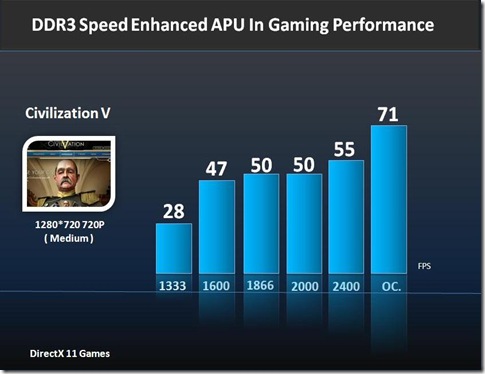
Here are the benchmarks of four DirectX 11 titles that we enjoy playing; Dirt 3, Dragon Age II, Metro 2033 and Civilization V.

Dirt3

DragonAgeII

Metro2033

CivilisationV

As you can see, you can expect to enjoy a decent performance boost with each successive memory clock increase. Civilization V stands out an example of how even relatively affordable DDR 1600 RAM can be used to effect a FPS change of huge significance – moving from 28 FPS to a much smoother 47 FPS. In short, APU users who invest in high-performance memory will be getting more performance out of their AMD APU – in 3 out of 4 cases we explored, that performance boost was pretty much incremental.

Overclocking Does Make a Difference

A few reviewers in the last week or so have concluded that AMD’s Llano APUs are entirely bandwidth constrained, and that overclocking the APU is more or less a waste of time. We attempted to explore that idea by getting our resident overclocker HiCookie to try and push the Lynx GPU on a higher RAM clock. The results here speak for themselves. Using our A75-UD3H board with HiCookie’s overclocked GPU settings, you’re entering another performance bracket entirely, with often double the frame rates of stock settings. If you’re going to use DDR 2400 RAM, there‘s clearly GPU headroom worth exploiting.

A Word to the Wise

So if you’re thinking of building a AMD A-Series rig anytime soon, bear in mind that the RAM you choose will have an effect on gaming performance. High performance RAM will allow you to get more out of the onboard Lynx GPU. But hey, don’t forget that you’ll probably have to configure the memory timings in BIOS according to the manufacturers recommendations (usually printed on the DIMM itself). SPD alone won’t get you there!

Good luck, and good gaming…

You can read this blog in Chinese (中文版) here.